Support
The Support page of the UzCloud console lets you open tickets, track their status and contact the support team.
- In the console header, open the Support page.
Submitting and Managing Tickets
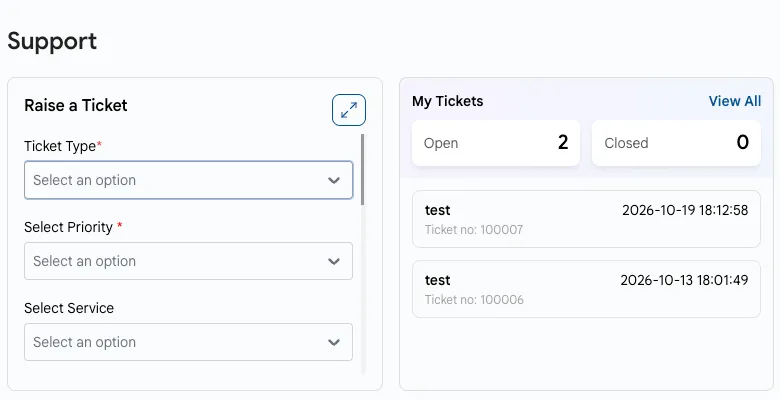
- In the Raise a Ticket form, select the Ticket Type, the Priority and, optionally, the Service your request is about.
- Enter the Subject and Message. If needed, attach files (drag them into the form or click Browse files).
- Click Submit.
- The My Tickets section shows the number of open and closed tickets and your latest tickets. Click View All to see all tickets and their status.
Need Immediate Assistance
- If you need immediate help, contact customer service by email at info@uzcloud.uz or by phone at +998 77 718 76 70 (every day, 8 AM to 9 PM).
- Keep your CRN (Customer Reference Number) ready — it is shown under your name in the upper-right corner of the console. This speeds up assistance.