
Picture the following scenario: your online store is growing successfully, you launch a long-awaited marketing campaign, and hundreds of customers land on your website at the same time. But instead of a surge in sales, you get frozen pages and database connection errors. The site can't handle the load, customers turn to competitors, and you lose revenue.
The reason is simple: your project has outgrown the capabilities of standard shared hosting, where hundreds of websites share the resources of a single server. The solution in this situation is to rent a virtual server, known as a VPS (Virtual Private Server) or VDS (Virtual Dedicated Server).
To understand the difference between these hosting technologies, let's use a simple analogy:
- Shared hosting can be compared to a bed in a hostel dorm room. It's cheap, but you share the kitchen, bathroom, and common areas with strangers. If your neighbor starts making noise or takes over the entire fridge, it creates discomfort for everyone else.
- VPS or VDS can be compared to renting a separate apartment in a multi-story building. You have your own front door, your own kitchen and bathroom. You're free to paint the walls, arrange the furniture, and invite guests. Neighbors still live behind the wall, but their daily life never overlaps with yours.
- A dedicated physical server can be compared to buying or renting your own private house. You are the sole owner of the entire building and the surrounding property. There are no neighbors, but all the responsibilities for maintaining the roof, heating, and utilities fall entirely on your shoulders.
VPS and VDS: What Is the Real Difference?
When you study provider offers, you will almost certainly encounter both acronyms. Historically, they designated different approaches to splitting the resources of a physical server, but marketing and technological evolution have blurred these boundaries. Let's break down the technical differences that originally stood behind these terms.
Software Virtualization (OpenVZ, LXC)
Historically, this approach was called VPS. With software virtualization, all virtual machines run under a single common operating system installed on the physical server. They share the system kernel, and resource limits are configured at the software level.
This approach has benefits: resources can scale on the fly without rebooting the server. However, there is a significant downside: isolation between users is incomplete. If one client consumes too much traffic or overloads the processor with complex calculations, it can slow down neighboring virtual machines. These plans usually do not allow running your own operating system or changing deep kernel settings.
Hardware Virtualization (KVM, Hyper-V)
This technology is traditionally called VDS. With hardware virtualization, a specialized program strictly splits physical server resources at the hardware level. Each virtual machine receives a guaranteed amount of RAM, CPU time, and disk space.
The main advantage of KVM is complete independence. Each machine has its own isolated operating system kernel. You can install any OS, configure it for your unique project requirements, and stay confident that neighboring activities will not affect your website stability.
How Do Virtual Servers Work?
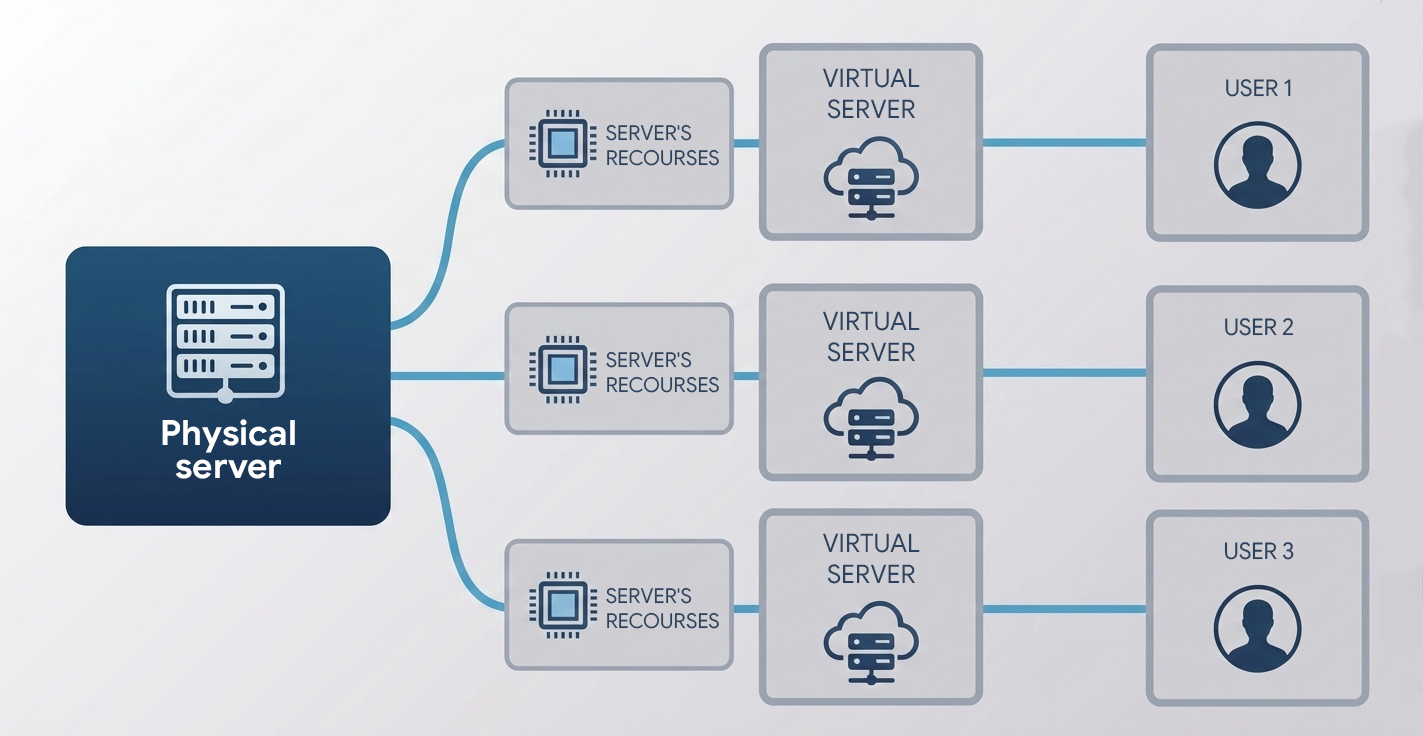
At the core of any virtual server lies physical equipment: a high-performance computer installed in a data center rack. But how does one computer transform into dozens of isolated environments?
Hypervisor Operations
To split resources, providers use a specialized software layer called a hypervisor. It is installed directly on the physical server and controls all hardware capacities: processors, RAM, network cards, and disk drives.
The hypervisor distributes these resources among the created virtual machines according to the selected plans. For the operating system installed inside the virtual machine, the process looks exactly as if it were running on a real physical computer with its own CPU and memory.
Process Isolation
The hypervisor ensures that users do not interfere with each other by creating digital barriers between virtual servers. An operating system on one VPS cannot access the files or RAM of another VPS running on the same server. This guarantees stable performance and high data security. If a neighboring server is compromised, attackers cannot enter your system through shared memory.
How Do VPS and VDS Differ from Other Hosting Types?
To help you navigate the variety of server solutions, we have gathered the key differences in a clear table.
| Feature | Shared Hosting | Virtual Server (VPS/VDS) | Dedicated Server | Cloud Server (VPC) |
|---|---|---|---|---|
| Access Rights | Limited, management via hosting panel only | Full root access privileges | Full root access privileges | Full root access privileges |
| Resources | Dynamic resources shared among all websites on the server | Guaranteed RAM and CPU volume | All physical hardware belongs exclusively to your project | Dynamic resources that scale instantly on the fly |
| Neighbor Impact | High; an overload on one website slows down the rest | None under KVM hardware virtualization | Completely absent; you are the sole user of the server | Completely absent due to distributed architecture |
| Scalability | Minimal; requires changing the entire tariff plan | Moderate; memory or cores can be added via reboots | Complex; requires physical hardware replacement | Maximum; resources scale instantly to match any load |
| Billing Type | Fixed monthly fee | Fixed monthly fee | Fixed monthly rental fee | Pay-as-you-go for actual consumed resources |
| Fault Tolerance | Depends on the stability of a single physical server | Depends on the stability of a single physical server | Depends on the reliability of components on that server | Maximum; if hardware fails, the project automatically moves to another node |
We should clarify computing power allocation. In public clouds, resource overcommit is common, meaning physical CPU cores are shared among multiple clients. This standard global practice keeps the platform cost-effective.
Strictly fixed CPU resources are only available within private clouds or specific plans with dedicated cores. If your application requires guaranteed performance without fluctuations, choose an isolated infrastructure where the entire power of the physical hardware is assigned to your project.
Pros and Cons of Moving to VPS and VDS
Migrating your projects to a virtual server opens new technical opportunities for your business but requires a balanced approach. Let's look at both sides of this decision.
Advantages
- Complete Freedom of Action: You receive root access privileges. This allows you to install any libraries, configure the web server, modify system file configurations, and deploy software not supported on shared hosting.
- Dedicated IP Address: On shared hosting, hundreds of sites use a single IP address. If a neighbor sends spam, the address gets blacklisted, and your client emails might be blocked by mail services. A VPS gives you a clean, dedicated IP address.
- Guaranteed Performance: You can always count on the allocated RAM and CPU power you paid for. The project will run stably even during peak traffic loads.
- Security: Hypervisor-level isolation protects your databases and files from unauthorized external access.
Disadvantages
- Administration Requirements: Managing a virtual server is more complex than standard hosting. You will need to configure security systems, track OS updates, and manage backups independently. If your team lacks a technical specialist, you will need to hire a systems administrator or use paid management panels with provider support.
- Cost: Renting a virtual server costs more than shared hosting, but the reliability and speed of your projects fully justify these expenses.
Who Needs a Virtual Server?
A virtual server is not necessary for a simple landing page or business card site, but it is indispensable for growing businesses and IT projects. Let's look at real use cases.
Large Web Projects
High-traffic online stores, news media, and complex corporate portals require fast page generation and handle hundreds of database queries every second. A VPS ensures stable website response times even during sudden traffic spikes.
Business Infrastructure
Large companies often migrate business-critical collaboration services to the cloud:
- Demanding CRM Systems: Systems like Bitrix24 require precise server environment tuning.
- Accounting Software: Platforms like 1C-Enterprise depend on fast database operations and strict protection of confidential information.
- Internal Portals: Corporate intranets and end-to-end analytical tools to track business performance.
Development and Testing
IT teams use virtual servers as isolated sandboxes to write and test code. A VPS makes it easy to set up automated assembly and deployment chains (CI/CD pipelines) and check update compatibility before pushing to production.
Specific Technical Tasks
Your own server allows you to configure custom tools for company needs:
- Corporate VPN: Secure connections for remote employees to the internal organization network.
- Mail Servers: Flexible rules for filtering and routing emails.
- IP Telephony: Popular communication platforms to connect with clients.
- Automated Bots: Automated trading bots, Telegram bots, and open-data scraping scripts.
How to Choose the Right Provider and Plan
When choosing a virtual server, evaluate provider offers using objective criteria rather than impulsive decisions.
Operating System Selection
Most servers run on Linux-based operating systems, such as Ubuntu, Debian, or CentOS. They are free, stable, and perfect for most modern websites and databases. Windows Server is chosen when a project relies on Microsoft technologies, like ASP.NET, or requires specific corporate software. A Windows Server license is usually paid separately, which increases rental costs.
Technical Resource Parameters
- Number of CPU Cores (vCPU): The more cores allocated to your server, the faster it processes complex calculations and user requests.
- RAM Volume: Simple sites can run on 1 or 2 GB of memory, but heavy databases, 1C, or CRM systems require 4 to 8 GB or more.
- Drive Type: Choose fast solid-state drives like SSD or NVMe. Outdated HDD drives are only suitable for backups, as their read and write speeds are too slow for modern dynamic websites.
Virtualization Technology Selection
Make sure the provider offers KVM hardware virtualization. This guarantees you receive the exact CPU and memory performance stated in your plan, with no hidden resource sharing among other clients.
Data Center Location
The physical location of the servers directly affects ping, which is the time it takes for a signal to travel from the user's computer to your website. The closer the server is to your target audience, the faster pages load. If your business operates in Uzbekistan, choose a provider with servers in Tashkent. This guarantees fast response times and ensures full compliance with local laws on storing citizens' personal data inside the country.
Technical Support and Control Panels
If you lack an in-house systems administrator, check for convenient control panels like ISPmanager or FastPanel. They let you manage databases, email, and websites via a simple visual interface without using the console. Continuous 24/7 technical support availability is also critical. Review the Service Level Agreement (SLA), which defines the guaranteed server uptime throughout the year.
Conclusion
Moving to a VPS or VDS is an important step in developing any internet project or business infrastructure. It provides the necessary independence, speed, and security.
Migration checklist: it is time to move to a virtual server if:
- Your website regularly slows down or becomes unavailable during traffic growth.
- The project requires specific software configurations that are restricted on shared hosting.
- You plan to deploy corporate tools like 1C, CRMs, or a custom mail server.
- You need full control over security settings and guaranteed resources that you do not have to share with neighbors.
We at UzCloud offer reliable VPS/VDS cloud servers based on modern KVM virtualization as part of our Virtual Private Cloud (VPC) service. Our equipment is housed in a modern Tier III data center in Tashkent, guaranteeing minimal ping for users in Uzbekistan and complete compliance with local data residency legislation.