
A developer writes a service on their laptop, and everything works perfectly. A tester runs the same code in a staging environment, but the application crashes because of a different Python version, an incompatible library, or a missing environment variable. In production, it turns out that the server was configured manually six months ago, and nobody remembers its configuration.
The phrase “it works on my machine” has long been one of the main reasons for release delays. Docker solves this problem by packaging an application together with its environment and dependencies. As a result, it runs consistently both on an engineer’s laptop and in a cloud data center.
For businesses, this means more predictable releases, shorter time to market, and fewer service disruptions caused by environment-related errors.
Containers vs. Virtual Machines: What’s the Difference?
A virtual machine emulates a separate computer with its own operating system. A container uses the host operating system’s kernel, isolating only the application’s processes, file system, and network.
Thanks to this architecture, a container starts in seconds and takes up tens of megabytes instead of gigabytes. A single physical server can host 3–5 times more containers than virtual machines, directly reducing computing infrastructure costs.
A virtual machine can be compared to a detached house outside the city, while a container is more like an apartment in an apartment building: the foundation and utilities are shared, but each unit has its own layout and lock.
In cloud environments, these technologies usually complement each other. Containers run inside virtual machines: the virtual machine provides isolation at the infrastructure level, while Docker handles application delivery.
Docker Architecture
Docker is built on a client-server architecture. Its operation is based on interaction between three key components:
-
Docker Client (CLI): the interface through which an engineer sends commands such as
docker buildanddocker run. -
Docker Host (Docker Daemon / Engine): the background
dockerdprocess that receives requests from the client, builds images, and manages containers, networks, and volumes. - Registry: a storage repository for images, such as Docker Hub, GitLab Container Registry, or Harbor.
A Visual Overview of How Docker Works
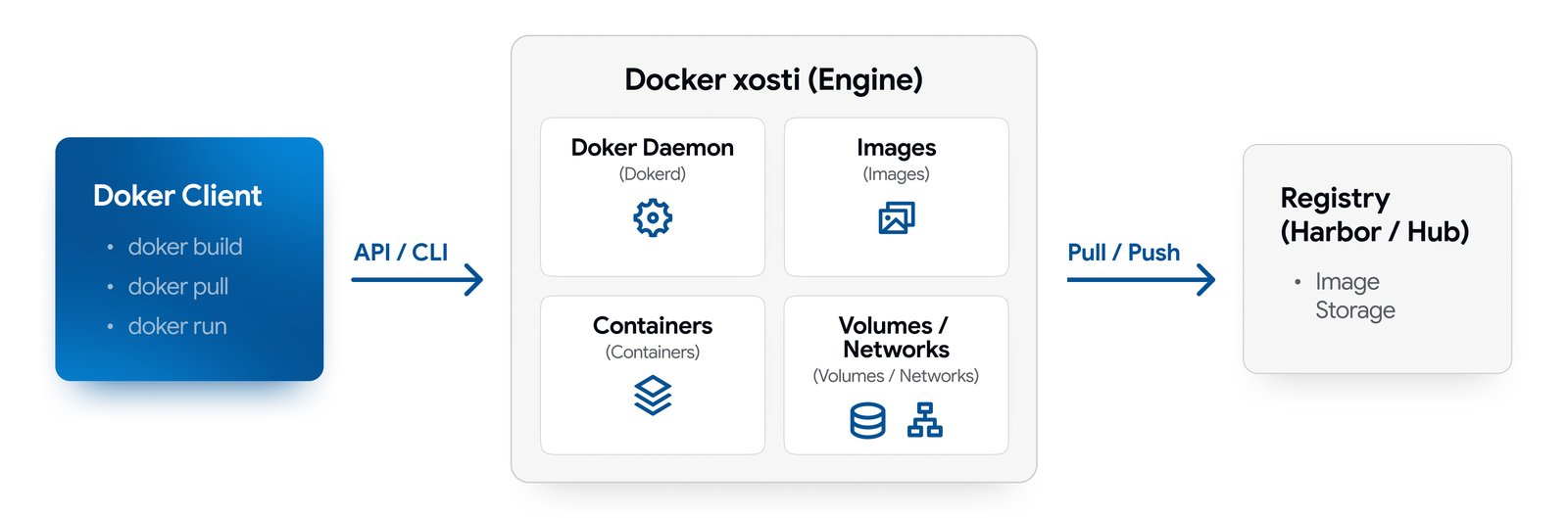
The Main Components of the Docker Ecosystem
Images and Dockerfile
An image contains the application, its configuration, and dependencies. It is built using a Dockerfile — a text-based set of instructions stored in Git alongside the application code.
An image is immutable. Once an image has been built and passed automated tests, deploying it by digest guarantees that exactly the same code will reach production. Tags can be overwritten, so pinning an image by digest prevents versions from being accidentally substituted.
Container
A container is a running instance of an image. You can instantly launch any number of identical containers from a single image and, when necessary, stop and recreate them within seconds.
Docker Compose
Modern applications consist of several components: a web service, database, cache, and message queue. All services are defined in a compose.yaml file and started with a single docker compose up command. Networks are then created automatically, volumes are attached, and services are launched.
Docker Compose describes the application environment. To manage the infrastructure itself as code (Infrastructure as Code), the UzCloud ecosystem provides our Terraform provider.
Registry (Image Registry)
Images are stored in a registry. Docker Hub is used by default, but companies often set up an isolated registry of their own, such as Harbor. A typical code delivery workflow looks like this:
Code → docker build → Image → Registry → docker pull → Container on the server.
Volumes and Networks
Containers are created as temporary objects: when a container is removed, the data stored inside it is deleted as well. Volumes are used to store databases and uploaded files, preserving data on the host. Built-in networks isolate services from the outside world and allow containers to communicate with one another by name.
Docker and Alternative Runtime Environments
Containerization is not limited to solutions from a single company. Alternatives such as Podman, containerd, and CRI-O are also available. The image format itself is standardized by the OCI consortium. This means that an image built with Docker can run in any compatible environment.
Docker’s main strength lies in its ecosystem. Dockerfile and Compose have become industry standards, and most open-source projects come with ready-to-use instructions for running them with Docker.
Docker Products and Licensing
Let’s look at the differences between Docker products to help avoid legal risks:
- Docker Engine: a free, open-source engine for Linux servers. It is the component that runs on cloud virtual machines.
- Docker Desktop: an application for workstations running Windows and macOS. It is available free of charge for personal use, education, non-commercial open-source projects, and small businesses (up to 250 employees and up to $10 million in annual revenue). Large companies and government organizations require a paid subscription.
- Docker Hub: imposes download limits on images for free accounts. Once the limit is exceeded, CI/CD servers receive an HTTP 429 error. To keep automated build pipelines running reliably, companies authenticate their requests or set up their own local registry.
The Business Case: When Does a Company Need Its Own Docker Host?
Deploying Docker on your own virtual machine addresses several clear business needs:
- Reducing server infrastructure costs by 40–60%: a single server can host more services compared to traditional virtual machines.
- Faster service deployment: ready-to-use environments can be launched without manually configuring servers or dealing with failures caused by manual setup.
- Standardized development: maintaining the same environment across developers’ laptops, staging systems, and production eliminates the risk of environment-related release errors.
- Security and control: data, configurations, and the image registry remain within the company’s private infrastructure perimeter.
As a project outgrows the capabilities of a single host, scaling becomes an issue. Docker and Compose are excellent choices for getting started and running smaller projects. However, when workloads increase and a single host can no longer provide sufficient resources, you can move to Managed Kubernetes on UzCloud. We take care of the control plane, freeing you from the need to administer the cluster manually.
How to Run Docker Reliably on a Server
Simply installing Docker and launching containers is not enough to ensure a reliable production environment. There are five key factors to consider:
- Resource limits: containers share the host’s CPU and memory. Without explicitly defined limits, a single service experiencing a memory leak can bring down neighboring applications.
- Disk and log management: images, layers, and logs gradually fill up disk space. Configure log rotation and remove unused layers. Use fast SSD drives for databases.
- Security: access to the Docker daemon is effectively equivalent to root access to the server. Do not expose the daemon API to the internet. Use rootless mode, run processes as unprivileged users, and scan base images for vulnerabilities. There is also an important networking detail to consider: published Docker ports bypass UFW rules, so external access must be restricted through cloud security groups.
-
Backup: a container can be recreated in seconds, but data stored in volumes requires regular backups. Periodically test the recovery of volume backups,
compose.yamlconfigurations, and databases. -
Monitoring: service health and resource usage should be tracked through monitoring systems such as Prometheus and Grafana, rather than by manually running commands like
docker ps.
What Changed in Docker in 2026?
Engine 29 Update
In 2026, Docker Engine 29 is the current major version. With this update, gvisor-tap-vsock became the default network driver in rootless mode, providing high network performance and isolation.
Free and Secure Hardened Images (DHI)
Docker has moved its Hardened Images catalog into the category of free solutions under the Apache 2.0 license. The catalog includes more than 4,000 minimal and hardened images, including Alpine, Debian, popular database management systems, and runtimes.
These images come with SBOM attestations and VEX reports indicating which vulnerabilities are actually exploitable. As a result, the number of known, currently relevant vulnerabilities is close to zero.
Integration with AI Infrastructure
Docker is actively developing tools for AI development:
- Docker Model Runner: allows language models to run locally.
- MCP Gateway: secures and regulates the connection of external tools to AI systems.
-
Ask Gordon AI Assistant: integrated into the CLI and Docker Desktop to help write and optimize Dockerfiles through the
docker aicommand.
Why Do Local Companies in Uzbekistan Need Container Infrastructure?
For companies operating in Uzbekistan, deploying Docker on local cloud infrastructure helps address both legal and technical requirements:
- Regulatory compliance: hosting database volumes within a sovereign cloud helps meet the requirements of the Law of the Republic of Uzbekistan “On Personal Data”. Your data does not leave the country.
- Independence from external connectivity: a local image registry hosted in Uzbekistan is not affected by external blocks or download limits. Images are downloaded over the local network at maximum speed.
Ready-to-Use Docker Infrastructure on UzCloud
A preconfigured Docker image is available in the UzCloud Marketplace. Instead of going through the entire manual setup process — selecting a server, installing an operating system, configuring repositories, and installing Engine and Compose — you can launch a virtual machine with Docker already installed in just a few clicks.
The UzCloud catalog also includes tools for building a complete development lifecycle:
- Harbor: an isolated image registry with vulnerability scanning.
- GitLab and GitLab Runner: code storage, automated builds, and deployment.
- Coolify: a convenient web interface for managing containerized applications.
Together, these tools form a straightforward and secure infrastructure workflow:
GitLab → CI/CD → docker build → Harbor → Docker Host on UzCloud → Running Service
Your entire infrastructure, virtual machine resources, networks, access permissions, and backups remain under your team’s full control. When your project outgrows the capabilities of a single host, you can easily migrate it to Managed Kubernetes on UzCloud.
Deploy an Isolated Docker Host in 5 Minutes
If you need a ready-to-use container environment without spending time manually configuring dependencies, visit the UzCloud Marketplace.
Choose the Docker image, specify the required CPU, RAM, and disk capacity, and launch your working environment in Uzbekistan’s sovereign cloud. Our support team will help you build a fault-tolerant architecture at every stage.