Open Only What You Need
Every open port is a potential entry point. A database, admin panel or remote access port open to the whole internet is found by scanners within hours.
Rule 1. Open Only the Required Ports
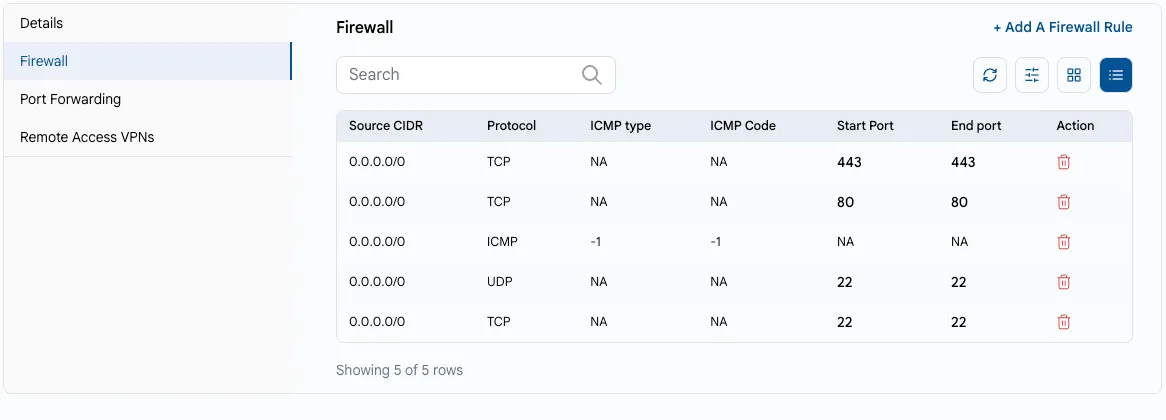
In UzCloud, inbound traffic to a public IP address is controlled by firewall rules in the console. A port is reachable from the internet only if there is a rule for it.
- Open the public IP address of the VM: Networks → Public IP Address, or the Firewall tab in the VM settings. See Public IP Address and Firewall.
- Review the rules and delete the ones you don’t need.
- Open web ports (80, 443) for everyone only if the VM serves a public website.
Rule 2. Restrict Remote Access by IP
Do not open SSH (22) and RDP (3389) for 0.0.0.0/0. In the example below, SSH is open to the whole internet — this is exactly what bots look for:
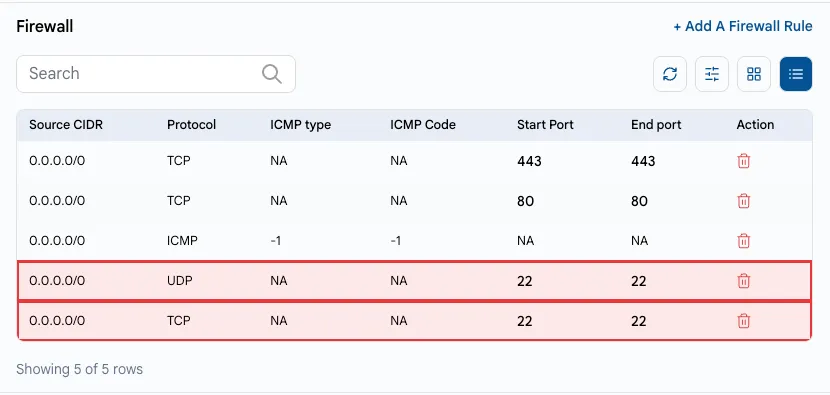
Delete such rules and add a rule only for your addresses. In the Source CIDR field, specify only the addresses you connect from, for example, your office IP with the /32 mask.
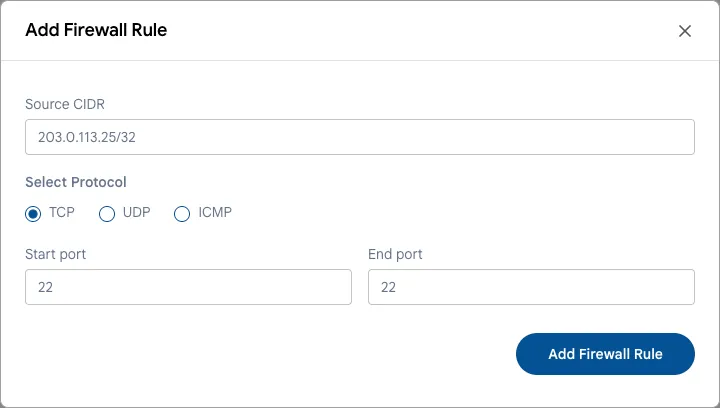
If you connect from changing addresses, use remote access VPN: enable it on the public IP address, add VPN users and allow SSH/RDP only inside the private network. See Public IP Address and VPN Users.
Rule 3. Never Expose Databases and Internal Services
Databases (MySQL 3306, PostgreSQL 5432, MongoDB 27017, Redis 6379), admin panels and monitoring should not be reachable from the internet.
- Place them in a private network or VPC without public port forwarding. See VPC Network.
- Connect to them from application servers in the same network, or through VPN.
- To publish a web application, use a Load Balancer instead of opening the application ports of every VM.
Rule 4. Check What Listens Inside the VM
Even if a port is closed in the console, it’s better not to run services you don’t need. Show the listening services:
sudo ss -tulpnStop and disable everything you don’t use or don’t recognize (old panels, test services):
sudo systemctl disable --now <service>As an additional layer, enable the OS firewall: ufw on Ubuntu and Debian, firewalld on Rocky Linux, AlmaLinux and RHEL.
Warning
Before you enable ufw or firewalld, allow SSH in it (sudo ufw allow 22/tcp). Otherwise, you will lose access. If this happens, use the web console.
Windows Server and RDP
- Allow RDP only from your IP addresses or through VPN.
- Use strong passwords and enable Network Level Authentication (NLA, enabled by default on current Windows Server versions).
- Install Windows updates regularly — see Update the Operating System.
Conclusion
A minimal set of open ports and access by IP or VPN greatly reduces the attack surface of your VMs.