UzCloud Object Storage is compatible with the Amazon S3 API: you can work with it from the console and from any S3 client or SDK. This article lists the parameters that every client needs.
Connection Parameters
| Parameter | Value |
|---|---|
| Endpoint | https://s3.uzcstorage.uz |
| Region | default |
| Addressing style | path-style: https://s3.uzcstorage.uz/<bucket>/<object> |
| Access Key / Secret Key | the keys of your object store |
Important
Use the bucket name exactly as it is shown in the console, for example demo-store-001045.
Access Keys
- Open Object Storage in the console and click the name of your object store.
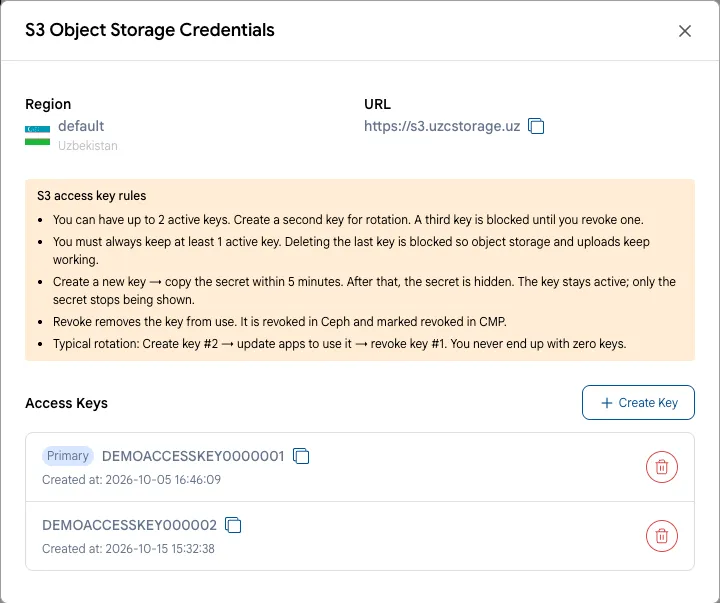
- Click Credentials. The Access Key is shown in the Access Keys list.
- The Secret Key is shown only within 5 minutes after you click Create Key. Copy it right away and store it in a password manager. If you lost the secret, create a new key and revoke the old one.
Client Settings
In addition to the endpoint, region and keys, check two settings in your tool or SDK:
- Path-style addressing must be enabled. The option is called differently in different clients:
addressing_style = path,forcePathStyle,use_path_style_endpoint,UsePathStyle,force_path_style. - Checksums —
when_required. New versions of AWS CLI and AWS SDKs add checksum headers to every request by default; this setting keeps them only where the S3 API requires them.
Ready-made settings for popular clients:
- Command line: AWS CLI, s3cmd, rclone, s3fs.
- File managers: Cyberduck, S3 Browser.
- Programming languages: Python, JavaScript, PHP, Go.
Tip
Any other library or application that supports a custom S3 endpoint also works, for example the AWS SDKs for Java and .NET, MinIO clients, or backup software with S3 support.