Static Routes
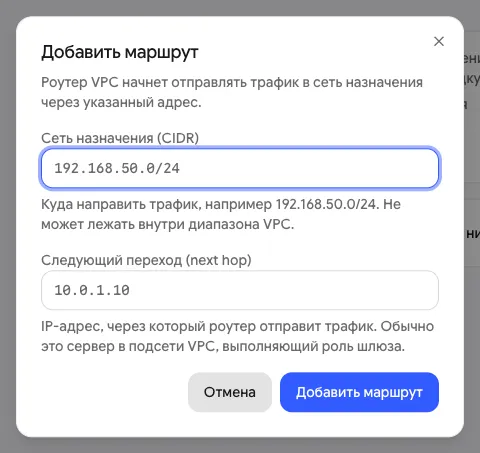
On the Маршруты (Routes) tab of the VPC page, you set static routes of the router: traffic to the destination network is sent to the specified address (next hop), for example a VPN gateway server or another site. Without routes, traffic inside the VPC and to the internet flows as usual.
- Click Добавить маршрут (Add route).
- Set the Сеть назначения (CIDR) (Destination network), for example
192.168.50.0/24. It can’t be inside the VPC range. - Set the Следующий переход (next hop) — the IP address the router sends traffic through, usually a server in a VPC subnet.
- Click Добавить маршрут (Add route).
Private Gateways
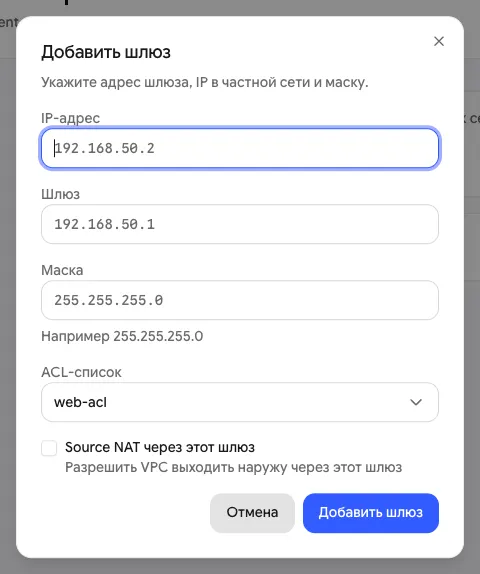
A private gateway connects the VPC to a private network, such as a data center network, without internet access. On the Частные шлюзы (Private gateways) tab, click Добавить шлюз (Add gateway) and set:
- the gateway IP-адрес (IP address) in the private network, Шлюз (Gateway) and Маска (Netmask);
- the ACL-список (ACL list) for traffic through the gateway;
- Source NAT через этот шлюз (Source NAT through this gateway) — allow the VPC to go out through this gateway.
Note
Agree on the private network settings (addresses, VLAN) with UzCloud support in advance.